OCR bank statement reader
Read scanned bank statements with OCR
Upload a PDF — AI reads every transaction , categorizes spending , and exports to Excel instantly. Use the parser when you need structured rows more than OCR-heavy document reading.
Choose The Right Tool
Need a spreadsheet export?
Use the Excel export when the main question is a clean spreadsheet rather than OCR-heavy reading.
Open the Excel export →Need structured rows first?
Use data extraction when the goal is turning statement PDFs into machine-friendly transaction rows for downstream systems.
Open data extraction →Need a spending report?
Use the analyzer when you want categories, charts, recurring charges, and a readable dashboard instead of just reading the file.
Open the analyzer →What you'll get
Your full spending report
Net saved in October 2024
Income
$7,712
Spent
$4,844
Activity
47 tx · ~$103/day
Find money you're leaving on the table
Cancel unused subscriptions
3 services you haven't used in 60+ days
Switch to cheaper phone plan
You're overpaying vs similar usage profiles
Cook 3 more meals per week
You averaged $42/meal eating out — 18 times this month
Ask your statement anything
Dining spending jumped 42% vs last month. You ate out 18 times — that's $42 per meal on average.
See where every dollar went
$4,844 across 7 categories
Your financial health, scored
Spot hidden recurring charges
8 subscriptions found · $349/mo
Free preview · Takes about 30 seconds
What it does
OCR reading plus usable output
Reads difficult PDFs first, then turns them into transactions you can review, analyze, and export.
AI reads any format
Works with text PDFs, scanned images, and any bank layout worldwide. No templates needed.
Auto-categorization
Every transaction sorted into 19 categories — groceries, transport, utilities, salary, subscriptions.
Export to Excel / CSV
Download all transactions in a clean spreadsheet — ready for accounting, tax prep, or budgeting.
Spending insights
Monthly totals, top spending categories, income vs. expenses, and trends across statements.
Multi-page support
Upload statements with dozens of pages. The reader processes all pages and combines transactions.
Privacy-first
Your PDF is processed in memory and immediately discarded — never stored on disk, never shared. Only the structured transaction data is saved to display your results.
AI-powered
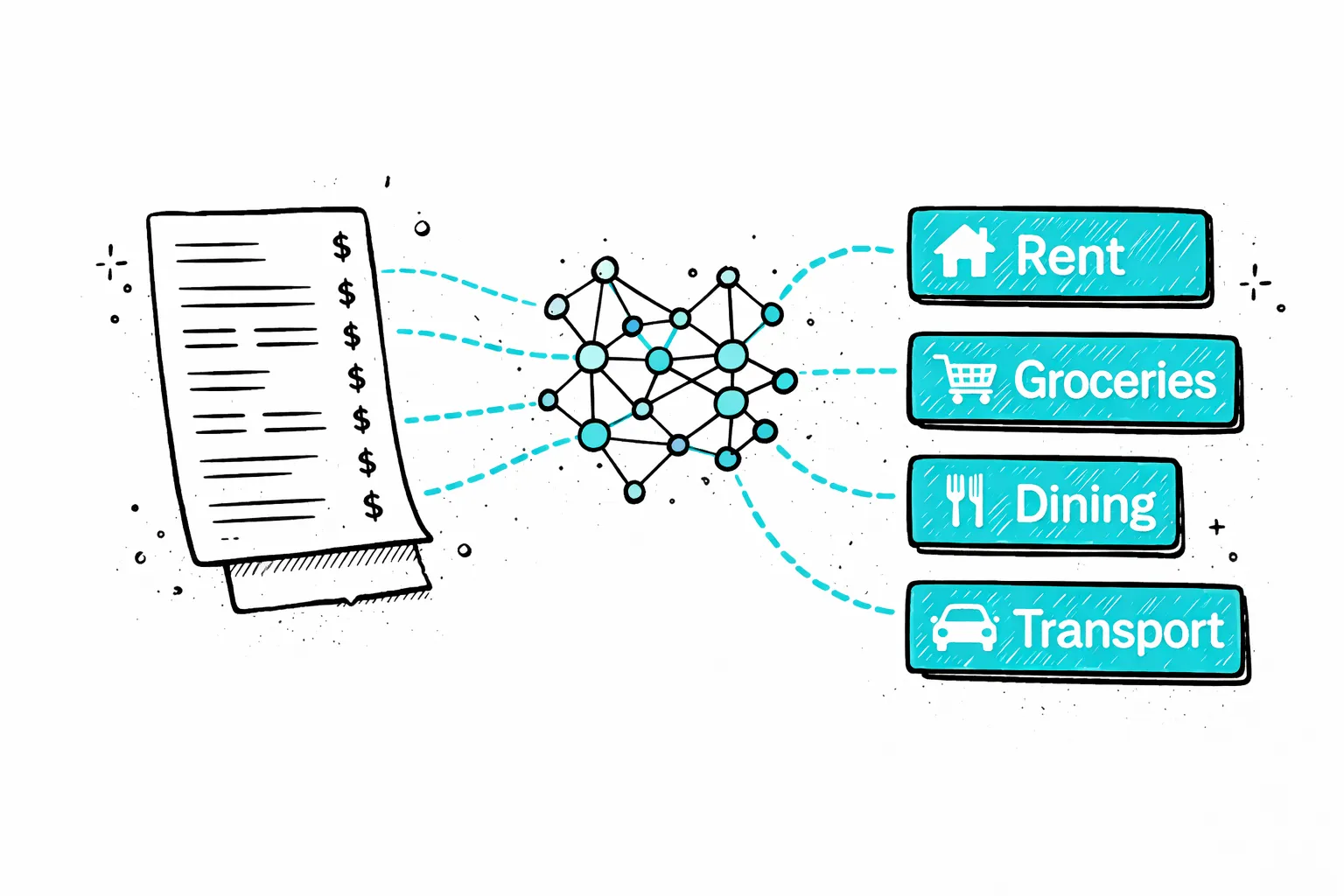
Reads cryptic merchant names — identifies the real business
“SQ *BLUE BOTTLE COF” becomes “Blue Bottle Coffee” in Dining. “AMZN MKTP US*2K7”becomes “Amazon” in Shopping. The AI understands merchant codes that would take you minutes to decode.
Each transaction is classified into one of 19 spending categories automatically — giving you a complete picture of where your money went without any manual sorting.
How it works
Three steps to read your bank statement
Upload your PDF
Drop your bank statement — digital PDF or scanned paper. JPG and PNG images also work. Any bank worldwide.
AI reads & categorizes
Every transaction is extracted — date, description, amount — and assigned one of 19 spending categories automatically.
View insights & export
See your full spending breakdown, top categories, income vs. expenses. Export to Excel or CSV with one click.
Read your bank statement digitally — no manual entry
Reading a bank statement manually means scrolling through pages of transactions, mentally adding up categories, and hoping you don't miss a charge. A digitalbank statement readerdoes all of that instantly — scanning your PDF, identifying every transaction, and extracting the key fields. What takes an hour with a highlighter takes the reader 30 seconds.
Our reader handles both digital PDFs andscanned documents. If your PDF contains selectable text, extraction is fast and precise. If it's a scanned image, OCR reads the pixels first, then AI processes the text. Either way, you get a clean, structured list of every transaction.
The reader works with bank statements from any country and any bank — Chase, Barclays, Deutsche Bank, HDFC, Commonwealth Bank, and thousands more. Upload your PDF, and within seconds you have a fullfinancial breakdownwith export options for CSV and Excel.

Secure
Your PDF is processed in memory and never saved to disk. All data is encrypted in transit.

Private
We never sell or share your financial data. Anonymous uploads are auto-deleted after 7 days.
Transparent
No hidden fees, no account required. Try it without an account, or create a free account for 1 analysis per month.
How much does it cost?
Upload free and see a preview. Pay only when you want the full breakdown.
One statement, full report
Perfect if you just need answers from one bank statement.
- Every transaction unlocked
- Spending categories & charts
- Subscriptions & recurring charges found
- Download CSV or Excel
Preview free first — pay $7 only to unlock everything
Monthly plan
For landlords, freelancers, and anyone who checks statements often.
Cheaper than two $7 unlocks if you check statements monthly.
- 50 statement pages per month
- Saved reports & history
- Subscription tracking on every upload
- Ask AI about your spending
Need more volume? See Pro & Business below
FAQ
Bank statement reader — FAQ
Ready?
Upload one statement.
Get the full picture.
No credit card. No account. Drop a PDF and see every transaction categorized in 30 seconds.
Try it free →Related reading
How to Read a Bank Statement
Every section explained — opening balance, transaction codes, closing balance, and what to watch for.
What Is a Bank Statement?
What a bank statement shows, how to get one, and how long to keep it.
Best Bank Statement Analyzer Tools
Comparison of AI-powered tools for analyzing and categorizing bank statements.