PDF to OFX converter
Convert a bank statement PDF to OFX free — upload the statement, get an .ofx you can import straight into Quicken, GnuCash, Moneydance, Microsoft Money, or anything else that speaks OFX.
See the difference
From messy PDF to clean OFX
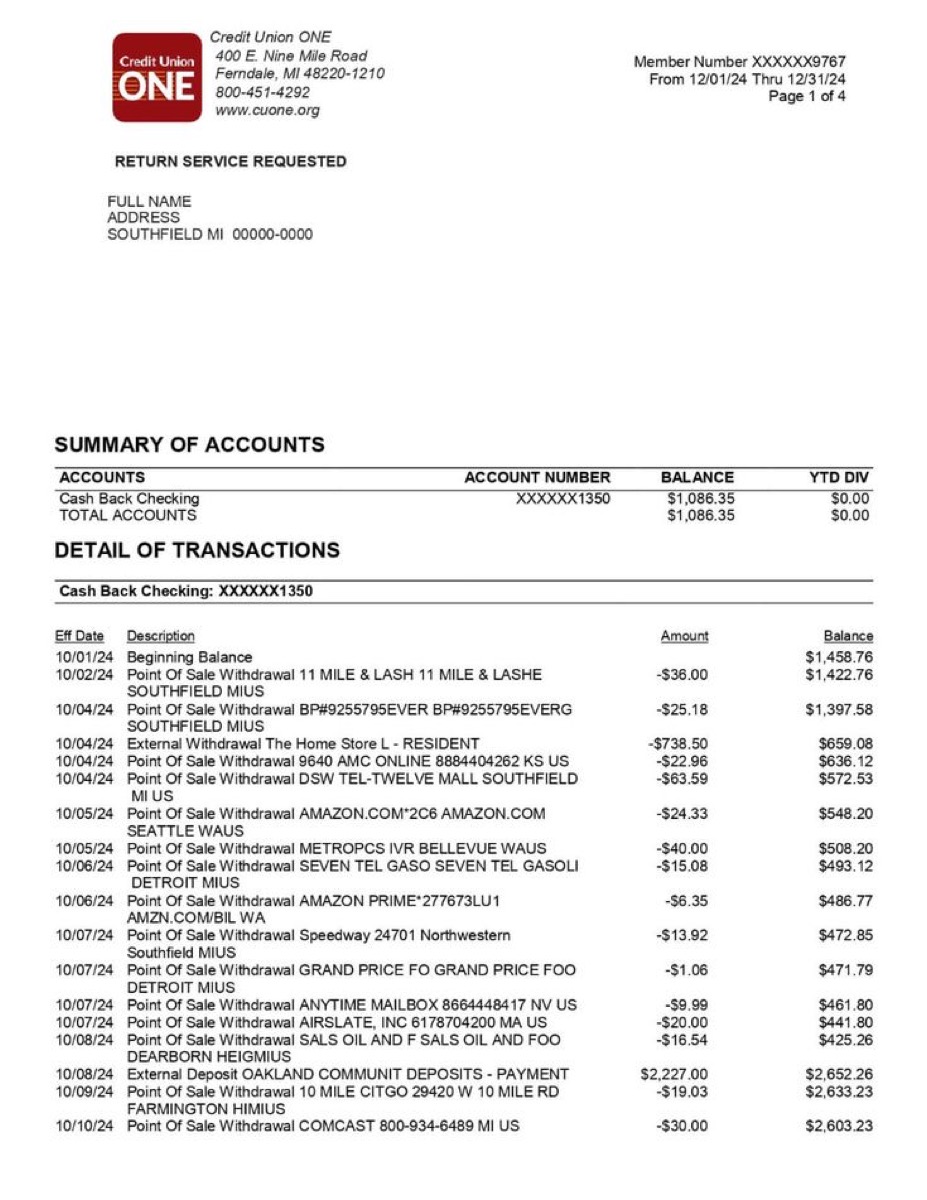
bankstatement.pdf
OFXHEADER:100
DATA:OFXSGML
VERSION:102

<OFX>
  <BANKMSGSRSV1>
    <STMTTRNRS>
      <STMTRS>
        <BANKTRANLIST>
          <STMTTRN>
            <TRNTYPE>DEBIT
            <DTPOSTED>20250115
            <TRNAMT>-67.42
            <NAME>WHOLEFDS MKT #10247
            <MEMO>Groceries
          </STMTTRN>
          <STMTTRN>
            <TRNTYPE>CREDIT
            <DTPOSTED>20250110
            <TRNAMT>3250.00
            <NAME>PAYROLL - ACME CORP
            <MEMO>Income
          </STMTTRN>
        </BANKTRANLIST>
      </STMTRS>
    </STMTTRNRS>
  </BANKMSGSRSV1>
</OFX>
bankstatement.ofx
How it works
Three steps to a clean OFX file
Upload your PDF
Drag and drop your bank statement — downloaded from your bank or scanned from paper. JPG and PNG images work too.
AI extracts every transaction
Our AI reads each transaction and structures it: date, payee, amount, and spending category — ready for OFX formatting.
Download OFX & import
Download the .ofx file and import it into Quicken, GnuCash, Moneydance, Microsoft Money, or any OFX-compatible software.
1.Upload your PDF
Drag and drop your bank statement — downloaded from your bank or scanned from paper. JPG and PNG images work too.
2.AI extracts every transaction
Our AI reads each transaction and structures it: date, payee, amount, and spending category — ready for OFX formatting.
3.Download OFX & import
Download the .ofx file and import it into Quicken, GnuCash, Moneydance, Microsoft Money, or any OFX-compatible software.
Why us
Not just a PDF converter — a bank statement parser
Preview
What the OFX export looks like
An XML-based .ofx file that Quicken, GnuCash, Moneydance, and Microsoft Money read instantly.
<STMTTRN> block represents one transaction with type, date, amount, payee name, and category memo. The OFX header tells your software the data format version and encoding.The problem
When you need a PDF to OFX converter
PDF to OFX: structured financial data from any statement
Converting a PDF bank statement to OFX gives you a structured, standards-compliant financial file that personal finance software can import cleanly. OFX (Open Financial Exchange) is the same format your bank uses when it sends transaction data to applications like Quicken or GnuCash through a direct connection. By converting your PDF to OFX, you get the same quality of data — transaction types, dates, amounts, and payee names — without needing a live bank feed.
The OFX format is built around a clear structure: each transaction is wrapped in a STMTTRN element containing tagged fields for the transaction type (TRNTYPE), posting date (DTPOSTED), amount (TRNAMT), unique identifier (FITID), and payee name (NAME). Our AI reads your PDF, identifies every transaction regardless of how your bank formats the statement, and maps each field to the correct OFX element. The output file includes proper OFX headers, account information blocks, and balance records.
What sets OFX apart from simpler formats like CSV or QIF is built-in duplicate prevention. Every transaction gets a unique FITID, and software like Quicken and GnuCash stores these IDs after import. If you later import an overlapping date range, the software automatically skips transactions it has already recorded. This is especially valuable for users who import statements monthly and need to avoid double-counted entries.
The converter supports PDFs from any bank worldwide and handles both digital PDFs and scanned paper statements. Multi-page documents are processed in full — a 15-page annual statement produces a single OFX file with every transaction in order. If you use Quicken, GnuCash, Moneydance, or Microsoft Money, OFX is the recommended import format. For QuickBooks Online users, our QBO converter produces the QuickBooks-specific variant of OFX instead.
Statement analyzer pricing
Pro
For heavy files and repeat work
- 200 PDF pages per billing cycle
- Unlimited visible transactions per report
- Subscription and recurring charge detection
- Priority support
Business
For lenders, accountants, and teams processing at volume
- 500 PDF pages per billing cycle, then $0.08/page
- REST API access with your own keys
- Unlimited visible transactions per report
- Priority support
FAQ
PDF to OFX converter FAQ
What is an OFX file?+−
Is this converter really free?+−
Which banks are supported?+−
Can I import the OFX into QuickBooks Online?+−
How is OFX different from QIF?+−
Is my bank statement data kept private?+−
What if my PDF is a scanned image?+−
Convert your PDF to OFX — free
No account required. Get a clean OFX file ready for Quicken in under 30 seconds.
Upload PDF & Convert to OFXAlready have a OFX file that won't import? Check it with the free validator — it names the exact line the importer is rejecting.