
Screenshot to Excel
Screenshot to Excel
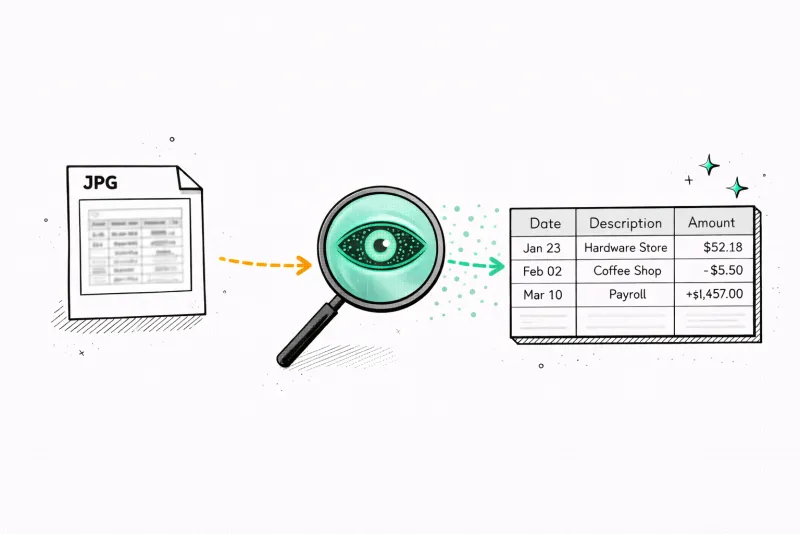
Upload any screenshot with a table — get OCR extraction , AI structure , Excel download in seconds.
What the Excel export looks like
A clean 4-column spreadsheet — opens instantly in Excel, Google Sheets, or Numbers. Every transaction categorized by AI.
How it works
Three steps to a clean spreadsheet
Upload your screenshot
Drop any PNG or JPG screenshot containing a table — bank statement, report, invoice, or any data table.
AI extracts the table
Our AI reads every row, column, and header from the screenshot — even without visible borders or with complex layouts.
Download Excel
Get a clean .xlsx file ready to open in Excel or Google Sheets. Every row and column, properly structured.
Beyond basic OCR
AI that understands table structure
Standard OCR reads characters but doesn't understand tables. It might read a date, amount, and description as one long string of text. Our AI identifies column boundaries even without visible gridlines.
It matches each value to the correct header and preserves the relationship between cells. The result is a properly formatted spreadsheet — not a wall of text dumped into a single column.
What people convert screenshots of
Any table visible on your screen can be screenshotted and converted to Excel.
Mobile banking apps
Screenshot your transaction history from any banking app — often the only way to export on mobile.
Financial dashboards
Capture tables from web portals, earnings releases, or analytics dashboards.
Invoice line items
Screenshot an invoice and extract quantities, descriptions, and totals into a structured table.
Spreadsheet screenshots
Have a screenshot of a spreadsheet but not the original file? Convert it back to a real .xlsx.
Accounting software
Capture tables from QuickBooks, Xero, or FreshBooks without needing a CSV export.
Any app or website
Any table visible on your screen — website, email, PDF viewer — screenshot it, convert it.
Turn any screenshot into a spreadsheet
Sometimes you don't have the PDF — you have ascreenshot. Maybe you captured your mobile banking app before logging out, or screenshotted a transaction history from your bank's web portal. That screenshot contains valuable data locked inside an image. Our converter reads it and gives you a real spreadsheet you can sort, filter, and calculate with.
Phone screenshots and desktop screenshots both work. On mobile, banking apps often don't offer a PDF export, so a screenshot is the only way to capture your transaction history. On desktop, you might screenshot afinancial dashboard, a report, or a table from a website. Our AI reads the rows and columns, identifies headers, and structures the data into a cleanExcel file— no manual re-typing required.
The most common use case is quick capture from a mobile banking app. You check your account, see recent transactions, screenshot it, and upload it here. Thirty seconds later you have an Excel file with every transaction neatly organized — ready to paste into your budget tracker, send to your accountant, or attach to an expense report.

Secure
Your PDF is processed in memory and never saved to disk. All data is encrypted in transit.

Private
We never sell or share your financial data. Anonymous uploads are auto-deleted after 7 days.
Transparent
No hidden fees, no account required. Try it without an account, or create a free account for 1 analysis per month.
Pricing
See where your money goes
Upload a statement and get answers in seconds. No card required.
- 1 analysis / month
- 50 transactions per document
- Auto-categorized transactions
- Money flow visualization
- Export to CSV, Excel, QIF, OFX & QBO
- 500 pages / month
- 100 transactions per document
- Everything in Free
- AI savings advisor chat
- Find hidden subscriptions
- 12 months history
- Everything in Basic
- Unlimited pages
- Unlimited transactions per document
- 5 image recaps / month
- Priority support
FAQ
Screenshot to Excel — FAQ
Ready?
Upload one statement.
Get the full picture.
No credit card. No account. Drop a PDF and see every transaction categorized in 30 seconds.
Try it free →