
Structured PDF parsing
Parse bank statements into structured transaction data
Upload a PDF — AI extracts transactions , merchants , categories in 30 seconds. Use this page when you need structured rows first; use the converter when you only need export formats.
Choose The Right Tool
Need raw extraction first?
Use the extraction page when the main job is pulling transaction rows out of the statement, not evaluating parser behavior in detail.
Open extraction workflow →Need OCR for scans and photos?
Use OCR when the hard part is reading scanned or image-based statements before parsing and categorization.
Open OCR workflow →Need export formats instead?
Use the converter when the goal is CSV, Excel, QIF, OFX, or QBO output rather than parsing internals.
Open the converter →How parsing works
From raw PDF to structured data
Step 1
Raw PDF input
Any bank, any format, scanned or digital
Step 2
OCR + text extraction
Every transaction line identified
Step 3
AI parsing
Merchant identified, category assigned
Step 4
Structured output
Dashboard + CSV export ready
Live demo
What the parser sees vs what you get
WHOLEFDS #0472 AUSTIN TX 02/28NETFLIX.COM 866-579-7172 CA 02/27SHL*SHELL OIL 57543987302 02/26PAYROLL DEP ACME CORP 02/25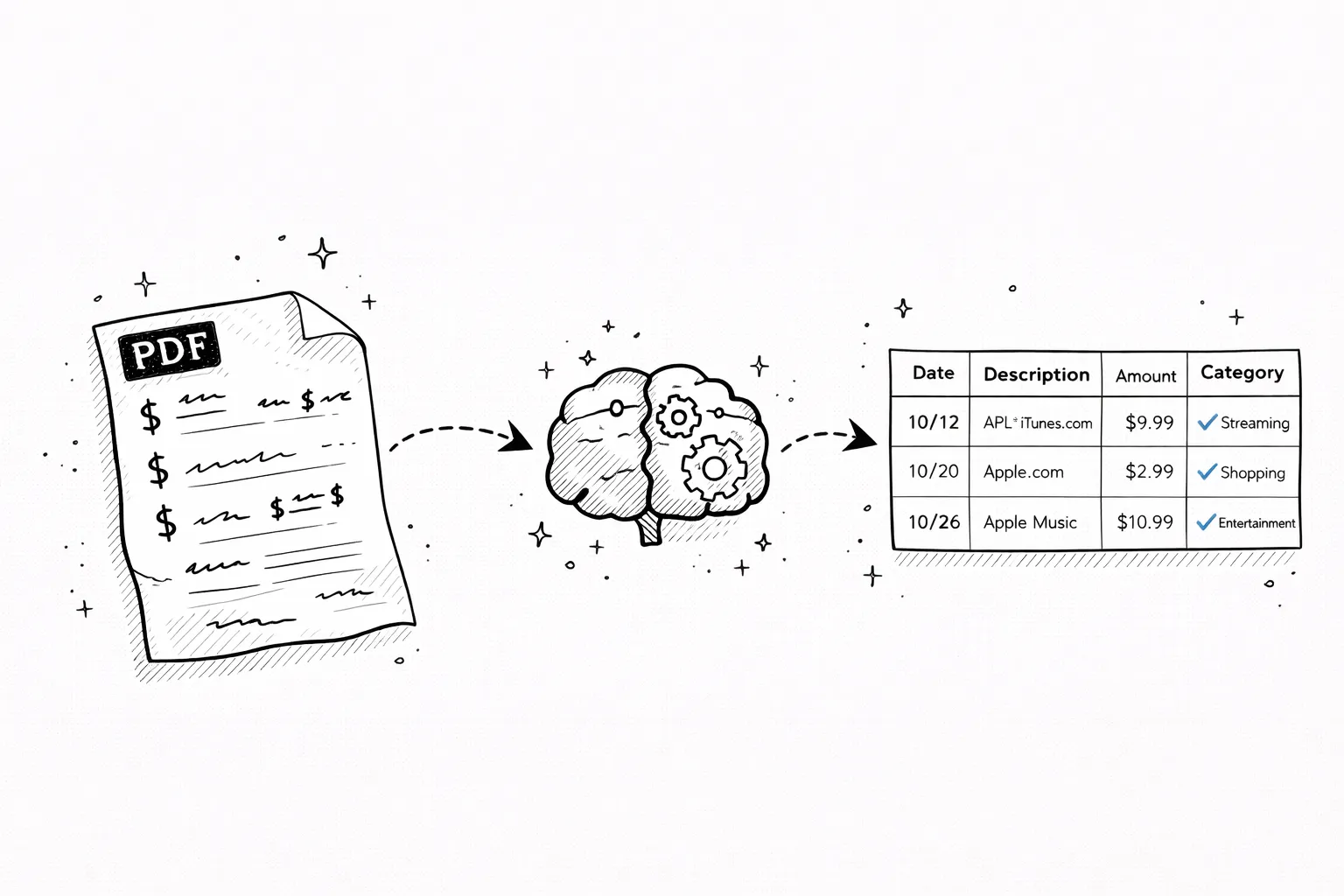
Not just OCR
Parsing understands structure, not just text
OCR reads pixels and outputs text. Parsing goes further — it understands that “WHOLEFDS #0472 AUSTIN TX” is a grocery purchase at Whole Foods and the number next to it is a debit, not a balance.
Every bank formats statements differently. Some use separate debit/credit columns, others use signed amounts. Date formats vary by country. Our AI reads the layout, infers the structure, and adapts automatically.
What a bank statement parser actually does
A parser doesn't just read text off a page. It understands the structure — column headers, row boundaries,date formats, debit and credit conventions — and maps every element to a clean data model. That structural understanding is what separates parsing from basicOCRor copy-paste.
Once parsed, the data is ready to use anywhere. Download asCSVfor Excel or Google Sheets, export toQIF / OFX / QBOfor accounting software, or use the visual dashboard directly. The parsed data is always the same — clean, structured, and categorized into19 categories.
Upload a Chase statement or a Barclays statement and the output format is identical: date, description, amount, and category for every transaction. The parser adapts to each bank's formatting automatically — no templates, no configuration, no manual mapping.
Review parsed data
What to verify after parsing a statement
Row boundaries
Look at transactions near page breaks and repeated headers first. Those are the places where parsing quality matters most.
Balance vs transaction rows
Make sure opening balances, closing balances, and summaries stayed separate from actual transactions.
Merchant normalization
Check whether noisy raw text was mapped to the merchant labels you expect, especially for local merchants and processors.
Output fit
Confirm whether the next step should be analysis, spreadsheet work, or accounting import. Parsing is the first stage, not always the last one.
What you'll get
Your full spending report
Net saved in October 2024
Income
$7,712
Spent
$4,844
Activity
47 tx · ~$103/day
$1,850
Largest expense
$103
Avg / transaction
22
Active days
Saturday
Busiest day
AI Insight
Dining spending jumped 42% vs last month. You ate out 18 times — that's $42 per meal on average.
Spending breakdown
$4,844 across 7 categories
Financial Health
Recurring · $4,188/yr
Potential monthly savings
Cancel unused subscriptions
3 services you haven't used in 60+ days
Switch to cheaper phone plan
You're overpaying vs similar usage profiles
Cook 3 more meals per week
You averaged $42/meal eating out — 18 times this month
50+ languages
Upload from any country — AI reads local scripts
Smart vision extracts transactions from any format — no matter the bank, country, or language

Secure
Your PDF is processed in memory and never saved to disk. All data is encrypted in transit.

Private
We never sell or share your financial data. Anonymous uploads are auto-deleted after 7 days.
Transparent
No hidden fees, no account required. Try it without an account, or create a free account for 1 analysis per month.
Pricing
Start with one report
Pay once when you need one full result. Subscribe only when statement work becomes regular.
- All transactions unlocked for this report
- Categories, charts, and subscription detection
- CSV and Excel exports included
- No renewal, no account required
Method & Evaluation
Supporting pages for teams evaluating a bank statement parser
These pages explain OCR behavior, extraction accuracy, supported statement types, and the differences between parsing, extraction, conversion, and analyzer-style workflows.
How It Works
→See how uploads move from PDF or image to structured transactions, categories, and export files.
Accuracy
→Understand what accuracy means for digital PDFs, scanned statements, OCR, categorization, and exports.
Supported Banks
→Check which statement types, regions, and export formats work best with the analyzer and converter.
Best Analyzer Guide
→Comparison-style page for buyers evaluating statement analysis tools and workflows.
Best Converter Guide
→Commercial comparison page for teams choosing a bank statement converter or PDF-to-CSV workflow.
FAQ
Bank statement parser FAQ
Ready?
Upload one statement.
Get the full picture.
No credit card. No account. Drop a PDF and see every transaction categorized in 30 seconds.
Try it free →Related reading
How to Analyze a Bank Statement
What to look for once your data is extracted — patterns, categories, anomalies.
Bank Statements for a Business Loan
What lenders check in parsed statement data and how to prepare.
Bank Statements for Self Assessment
Using parsed transaction data to calculate income and expenses for HMRC.