Reference tool
Bank statement example explorer
Compare real statement screenshots to see what the page actually looks like before you upload or send the actual file.
Browse screenshot examples first. When you want to inspect the real file after that, analyze a statement PDF or jump to sample PDF downloads.
Free tool
Browse real statement screenshots before you review the actual file
This gallery is image-first on purpose. You can compare real-looking statement screenshots, see how layouts vary by bank and region, and understand what reviewers usually notice before you touch the actual PDF.
Need downloadable sample PDFs?
Use the sample page if your search intent is reference PDF downloads rather than a screenshot comparison gallery.
Go to sample PDFsNeed one annotated walkthrough?
Use the annotated example page if you want a single statement explained section by section instead of many layouts.
Open annotated exampleNeed to inspect a real bank-issued file?
Use the upload workflow when you want AI to analyze your actual PDF rather than a reference screenshot.
Analyze a real PDFCommerce Bank · United States
Classic U.S. monthly statement with separate summary sections
This is the kind of page people expect when they search for a bank statement example: clear account summary, deposits and withdrawals broken into sections, then checks and ATM activity below.
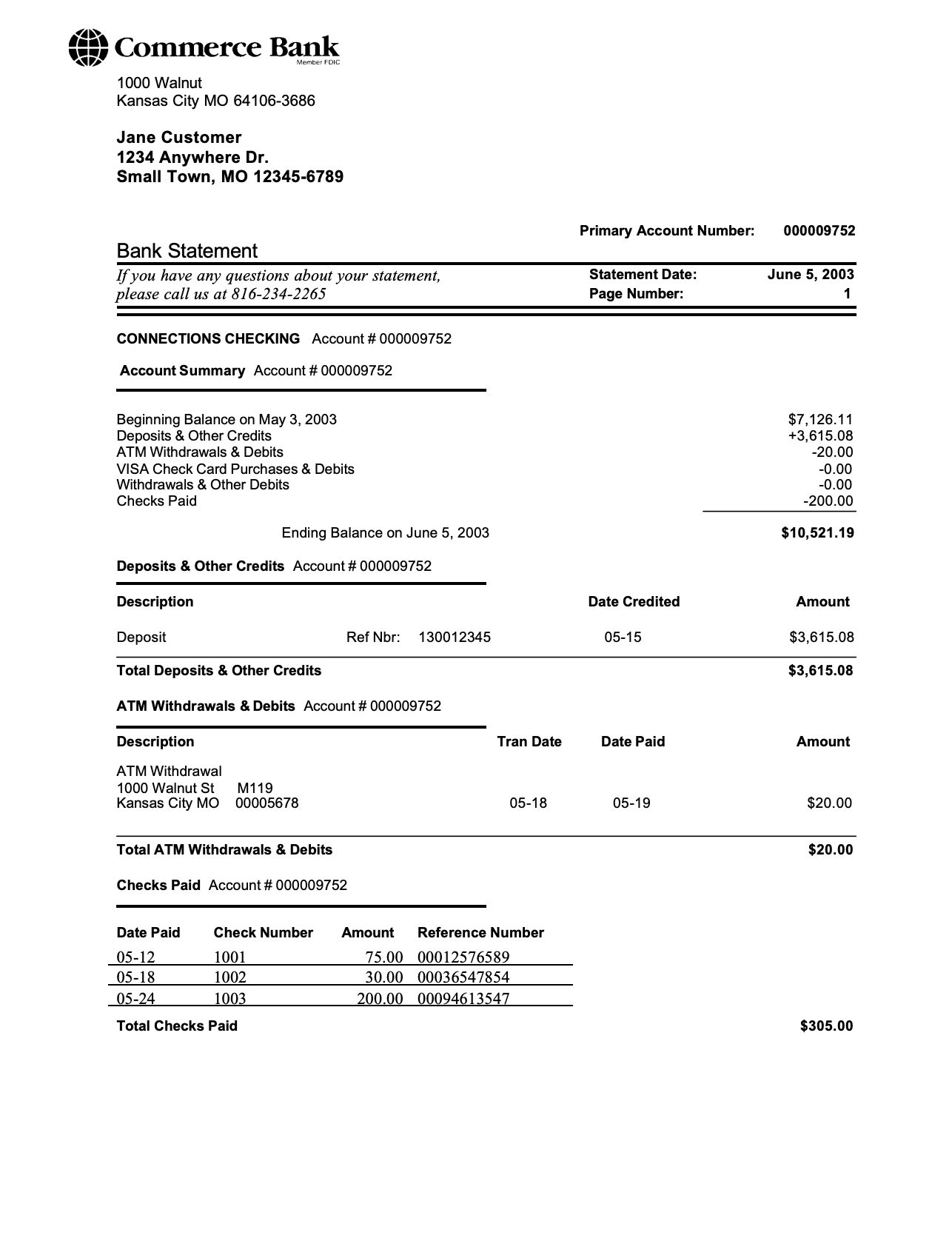
It teaches the default mental model fast: statement date, account number, beginning balance, ending balance, then grouped transaction categories.
This is the image-first version of the explorer. The point is to show what a real statement page actually looks like before anyone uploads a live PDF.
Natural next step
Move from sample layouts to the actual statement workflow
Once the structure makes sense, the useful next move is working with the actual statement: upload it, inspect deposits and balances, check recurring charges, and export the real data if you need to share or reconcile it.
What it gives you
Why this gallery is useful
This page is not trying to simulate a statement with fake rows. It is there to show what real statement pages actually look like across different banks, formats, and regions.
Built around real format variety
Compares real U.S., business, U.K., and international screenshots side by side instead of pretending there is one universal layout.
Annotated for reviewer intent
Shows the fields people actually ask about first: statement period, address block, balances, and transaction-table shape.
Useful before the real workflow
Hands off naturally into proof, readiness, and analysis tools once you move from the sample to the real PDF.
Who this explorer is for
This page is for structure and pattern recognition, not for generating fake documents or replacing a real bank-issued statement.
People preparing a document package
Useful when you want to understand what a lender, landlord, recruiter, embassy, or back-office reviewer will notice before you send the real statement.
Users comparing different bank layouts
Helpful when your PDF does not look like the typical U.S. sample you see in search results and you want a quick reference point.
Teams building statement workflows
Good for onboarding support, ops, and product teams who need a simple visual explanation of how statement structures vary by market and account type.
Search traffic around examples and samples
Strong bridge from what does a bank statement look like questions into document readiness, parser, and analysis workflows.
Deeper context
What stays consistent across almost every statement
The branding changes, but the useful pieces stay familiar. These are the fields most reviewers scan for first regardless of bank or country.
Identity block
The name, address, account number, and statement period are what make the document identifiable before anyone reads a transaction row.
Money in, money out, ending balance
Whether the layout uses summary cards or a compact row, reviewers want a fast read on inflows, outflows, and how the month ended.
Transaction table with balance context
A real statement usually shows a running balance or enough structure to reconstruct one. That is what separates it from a casual screenshot or raw ledger export.
Deeper context
How to use example statements safely
Examples are useful for education, onboarding, and pre-flight checks. They are not substitutes for a real bank-issued document.
Use samples to learn the structure
The right job for a sample is teaching someone what a normal statement looks like, where the key fields sit, and what reviewers typically care about.
Use the real PDF for decisions
The moment the task becomes underwriting, reconciliation, or compliance, the real file matters more than any example because the transaction detail and completeness become decision-critical.
Prefer anonymized reference screenshots over customer files
Reference screenshots are safer to publish and easier to explain clearly because they avoid privacy issues while still showing the structure people need to understand.
Supporting guides
Read the article version if you want more context
The tool gives you the quick read. These posts explain the thresholds, use cases, and document expectations behind the result.
FAQ